|
Standard Non-Programmable Features
Installation | Configure | Accessing | Config Examples | Non-Programmable Features
Read Only Registers
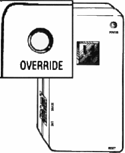
Manual Override Button Pressing this button will direct The Power Stonetm to supply a constant, uninterrupted supply of electricity to your connected equipment. The Power/Status LED will glow brightly, with no flashing. All inbound calls will be ignored by The Power Stonetm. Pressing the “OVERRIDE” button again will return The Power Stonetm to its previous programmed operating mode. In the event of a power outage, both “override’s”, the button and Register 05, revert to factory preset which is “Normal Operation” or OVERRIDE off. If The Power Stonetm is plugged into a power strip or wall outlet and you can’t get to it to press the OVERRIDE button, there is a touchtone command that will perform the same fúnction as pressing the OVERRIDE button. To do this you must have a touchtone phone connected to the DEVICE port. Press the * (star) symbol on your touchtone phone and The Power Stonetm will go into OVERRIDE. To get The Power Stonetm out of OVERRIDE and back to its previous operating mode, press the “Star” character twice, ” * * “. “Telephone OVERRIDE Command” will only work when the Power Stonetm is not in Manual Operating mode. Note: If you are in the programming mode, you cannot override by dialing ” * ” . In the event of a power outage, both “override’s”, the button and Register 05, revert to factory preset which is “Normal Operation” or OVERRIDE off.
Status/Power LED The Status/Power LED signals the status of power supplied to your equipment. If the light is blinking in a certain sequence, here’s what’s going on: 1) OFF – There is no power to The Power Stonetm. The 120 Volt wall outlet is “dead” due to a power outage on that particular circuit or perhaps to your whole house. 2) OFF/Blinking On Briefly Once A Second – The Power Stonetm is functional and has not been activated. It is not supplying power to your equipment. STATUS 3) ON/Winking Off Once A Second – The Power Stonetm has been activated and is supplying power to your connected equipment. 4) ON/Solid – The Power Stonetm is in “Override” mode and is supplying power to your equipment. 5) ON/Blinking Rapidly – The Power Stonetm is in Manual Operating mode and ready for programming or readback.
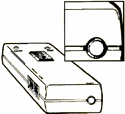
At the bottom of The Power Stonetm is a 15 Amp resettable breaker button. This button resets The Power Stonetm in the event that you overload its circuit and trip the breaker. Please pay special attention that you do not plug in multiple devices that could cause an overload to The Power Stonetm. If The Power Stonetm circuit breaker continues to blow, investigate the load requirements of each device that you have connected to The Power Stonetm‘s 120 Volt/15 Amp receptacle. |
Power Control by Telephone